在线AI教程 / AI工具
[Amazon Bedrock] Introducing the Web Search API on Amazon Bedrock AgentCore
人工智能 推出 Amazon Bedrock AgentCore 上的 Web Search API 那些要回答近期事件、产品发布、价格或法规问题的 AI agent 与应用,需要
人工智能
推出 Amazon Bedrock AgentCore 上的 Web Search API
那些要回答近期事件、产品发布、价格或法规问题的 AI agent 与应用,需要比模型训练数据更新的信息。此前,Web Search on Amazon Bedrock AgentCore 通过 AgentCore Gateway(Amazon Bedrock AgentCore 的一项能力)把这类信息交给 agent:这意味着要建一个 gateway、一个 web search target,再从 MCP client 调用这个工具。这套配置适合「让许多 agent 共用同一条搜索策略」的平台团队,可当你自己的代码只是想拿到搜索结果时,它就太多了。
今天,我们宣布 Amazon Bedrock AgentCore 上的 Web Search API。有了它,你自己的代码一次 API 调用就能搜索网页。它返回 Amazon 运营的网页索引里排好序的结果,每条都带一段文本摘录,能拿到时还有页面标题、URL 和发布时间。你从 AWS SDKs 或 AWS Command Line Interface(AWS CLI)调用它,用你其它 AWS 服务所用的同一份 AWS Identity and Access Management (IAM) credentials 签名。无需先创建任何资源:认证、调用、拿结果。把它用进一个应用、一段你自己写的 agent 循环,或一条数据流水线。
为什么需要一个独立 API?
对多数 agentic 工作负载,AgentCore Gateway 仍是推荐路径。它给 agent 一个安全的 Model Context Protocol(MCP)endpoint,把网页搜索与你的其它工具合在一起,还处理入站与出站认证、语义化工具选择,以及可选的 MCP sessions。但开发者告诉我们,在 gateway 并不合适的场景里,他们还需要一个更底层的集成点:
自定义编排框架 – 自己写 agent 循环、或用 LangChain、LlamaIndex 这类框架的开发者,想在自己的编排逻辑里把网页搜索直接当工具调用,而不是绕经 gateway。 非 agent 用例 – 并非每个需要网页事实依据的应用都是 agent。搜索驱动的 dashboard、事实核查流水线、内容富化工作流和监控系统,都能从实时网页结果里获益,却不必搭一套 agent 基础设施。 更紧地掌控请求生命周期 – 有些开发者想自己管重试、缓存和错误处理,而不是交给 gateway。 给既有应用更简单的集成 – 已有自己 API 层的应用可以直接调 Web Search API,不必采用整套 AgentCore Gateway 栈就能补上网页事实依据。
Web Search API 是对 gateway 的补充。它跑在支撑 Alexa+、Kiro、Quick 和其它 Amazon 产品的同一套搜索基础设施上,具备同样的质量与合规姿态,只是以一个直接的 API operation 暴露出来。
它如何工作
Web Search API 是 bedrock-agentcore data plane 上的 InvokeWebSearch operation,用的正是 AgentCore Browser(Amazon Bedrock AgentCore 的一项能力)等其它 AgentCore 工具所用的同一个 endpoint。请求用你标准的 AWS 凭证、以 AWS Signature Version 4 (SigV4) 签名,因此没有 API key 或 secret 要管。
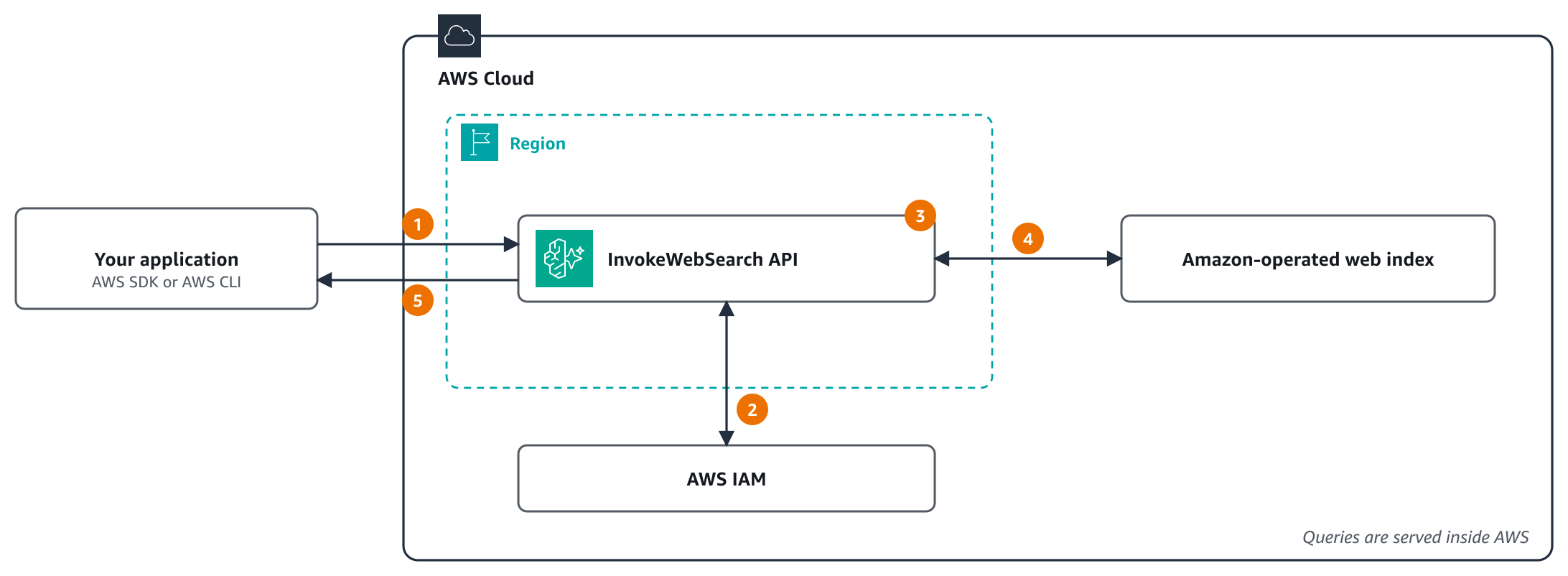
图 1:一次 Web Search API 请求的流转
按编号的步骤是:
你的应用用 AWS SDKs 或 AWS CLI 调用 InvokeWebSearch,它们用其 AWS 凭证以 SigV4 给请求签名。从 virtual private cloud(VPC)里发起时,调用可经 interface VPC endpoint。 API 向 AWS Identity and Access Management (IAM) 核查调用方在 AWS 托管的 web search 工具上是否有 bedrock-agentcore:InvokeWebSearch。 API 施加请求里的过滤条件:要包含或排除的域名,以及发布时间范围。 API 搜索 Amazon 运营的网页索引。查询在 AWS 内部完成,不发给第三方搜索引擎。 API 最多返回 maxResults 条排好序的结果,每条带文本摘录,能拿到时还有页面标题、URL 和发布时间。
调用身份只需对一个 AWS 托管资源具备一项 IAM 权限。它与 gateway 的 service role 做网页搜索用的是同一个 action 和 resource,因此一份策略覆盖两条路径。详见 Grant permission to call the API。
{ "Version": "2012-10-17", "Statement": [ { "Sid": "InvokeWebSearch", "Effect": "Allow", "Action": "bedrock-agentcore:InvokeWebSearch", "Resource": "arn:aws:bedrock-agentcore:us-west-2:aws:tool/web-search.v1" } ] }
第一次搜索请求
下面这个例子用 AWS SDK for Python (Boto3),在 US West (Oregon) Region(us-west-2)里搜索两个可信域名中 2026 年发布的页面:
import boto3
client = boto3.client("bedrock-agentcore", region_name="us-west-2")
response = client.invoke_web_search( webSearchId="web-search.v1", searchQuery="multi-region EKS cluster deployment best practices", maxResults=10, filters={ "domainFilter": {"include": ["aws.amazon.com", "kubernetes.io"]}, "publishedDateFilter": {"publishedAfter": "2026-01-01T00:00:00Z"}, }, )
for result in response["results"]: print(result.get("publishedAt"), result.get("title"), result.get("url"))
每条结果都有文本摘录。标题、URL 和发布日期只有在索引里有时才返回,所以用 get 去读。一次实调里的一条结果,做了删减:
{ "title": "One Amazon EKS, many edges: How to choose your edge container strategy on AWS", "url": "https://aws.amazon.com/blogs/containers/one-amazon-eks-many-edges-how-to-choose-your-edge-container-strategy-on-aws/", "text": "Separate the standard from the deployment model Choosing the wrong platform isn't really the issue. ...", "publishedAt": "2026-09-25T15:52:00Z" }
这就是集成的全部。若你的代码跑在 AWS Lambda、Amazon Elastic Container Service (Amazon ECS)、Amazon Elastic Compute Cloud (Amazon EC2) 或 Amazon Elastic Kubernetes Service (Amazon EKS) 上,execution role 会自动提供凭证。给那个 role 加上这项权限,同一份代码原样就能跑。
关键 API 特性
域名过滤 – 包含或排除特定域名,把搜索结果圈定在可信来源(例如一个专注 AWS 的 assistant 只用 aws.amazon.com 和 kubernetes.io)。每个列表最多 100 个域名,根域名也会匹配其子域名。 日期过滤 – 用 publishedAfter 和 publishedBefore 把结果限制在某个发布时间范围内,取 UTC 的 RFC 3339 日期时间,例如 2026-01-01T00:00:00Z。两端都含。 可配的结果条数 – 每次查询要 1 到 25 条结果。不设 maxResults 时,API 最多返回 25 条。搜索文本 searchQuery 最长 200 字符。 带文本摘录的结果 – 每条结果都含一段文本摘录,能拿到时还有页面标题、URL 和发布时间,可直接喂进你模型的 context window。
5 分钟内上手
拿到第一条结果有两种方式:
方式 1:AWS CloudShell(无需本地配置)
在浏览器里打开 AWS CloudShell。它使用你控制台会话的凭证。 你的 role 会有 bedrock-agentcore:InvokeWebSearch 权限,来自前面那份策略,或来自范围更宽的 AWS 托管策略 BedrockAgentCoreFullAccess。 运行: aws bedrock-agentcore invoke-web-search \ --web-search-id web-search.v1 \ --search-query "latest EKS features" \ --max-results 5
方式 2:本地开发
安装 AWS CLI,或你所用语言的 AWS SDK。Python 用 Boto3 1.43.127 或更高。 用前面那份策略创建一个 IAM role。 拿到该 role 的凭证:从应用或 AWS CLI profile 代入它,或通过身份提供方用它登录。 跑前面那个 Python 例子,或从任意 AWS SDK 调这个 API。
没有资源要创建,也没有 API key 要管。认证、调用、拿结果。
把 Web Search API 用进 agent 框架
Web Search API 天然嵌得进主流 agent 框架。LangChain agent 在 langchain-aws 1.9.3 及更高版本里通过 AgentCore web search tool 用它:
from langchain.agents import create_agent from langchain.chat_models import init_chat_model from langchain_aws.tools import create_web_search_toolkit
toolkit, tools = create_web_search_toolkit(region="us-west-2") model = init_chat_model("bedrock_converse:us.anthropic.claude-sonnet-5", region_name="us-west-2") agent = create_agent(model, tools=tools, system_prompt="Cite the URL of every fact you use.")
这个工具还能装上模型改不了的规则,比如要排除的域名、日期下限和搜索预算。它把结果作为可供你的代码核查的数据返回。完整例子见 daily dependency watch sample。它用 LangGraph 并行调研三个包生态,并在报告任何结论前把每条发现与其来源核对。
如果你更愿意自己包一层调用,一个朴素的 LangChain tool 也行:
from langchain.tools import tool import boto3 import json
client = boto3.client("bedrock-agentcore", region_name="us-west-2")
def web_search(query: str) -> str: """Search the web for current information.""" response = client.invoke_web_search( webSearchId="web-search.v1", searchQuery=query, maxResults=5, ) return json.dumps(response["results"], indent=2, default=str)
Pass web_search to an agent, for example create_agent(model, tools=[web_search])
不用框架时,AgentCore Python SDK 里的 WebSearchClient 包了同一个调用,返回带已解析日期的结果。langchain-aws 1.9.3 和 AgentCore Python SDK 1.26.0 加入了 Web Search API 支持,请装这些版本或更高。
内建的企业级控制
因为 Web Search API 用标准 IAM 认证,从第一次调用起你就拿到企业级控制:
IAM policies。按用户、组或 role 授予或拒绝 bedrock-agentcore:InvokeWebSearch。用 service control policies (SCPs) 跨账户强制护栏。 AWS CloudTrail logging。CloudTrail 把 InvokeWebSearch 请求记为 data events。data events 默认不记录,因此要给 trail 或 event data store 加一个针对 AWS::BedrockAgentCore::WebSearch 资源类型的 event selector。事件记录 web search 工具和 maxResults,不记录搜索文本或过滤条件。详见 Log AgentCore Web Search API calls with AWS CloudTrail。 VPC support。用 AWS PrivateLink 让 API 调用走你的私有网络而非公网。搭建与 endpoint 策略见本文后面的 Private connectivity with AWS PrivateLink。 Compliance。覆盖 AgentCore 的合规项目清单,见 Compliance validation for Amazon Bedrock AgentCore。 搜索留在 AWS 内。查询由 Amazon 运营的网页索引服务,不发给第三方搜索引擎。 Acceptable use。详见 Web Search API Acceptable Use documentation。
配额按账户计。默认值与如何申请提升,见 Quotas for Amazon Bedrock AgentCore。
默认每个账户在每个 Region 每秒最多发 10 个请求,可申请提升。详见 AgentCore Web Search Service Quotas。
用 AWS PrivateLink 做私有连接
处理敏感数据的 agent 和流水线,常跑在没有出网路由的私有子网里。借 AWS PrivateLink,这些代码能经你 VPC 里的 interface VPC endpoint 调 Web Search API。你的 VPC 与 API 之间的流量留在 AWS 网络上,抵达它不需要 internet gateway、NAT gateway 或代理。
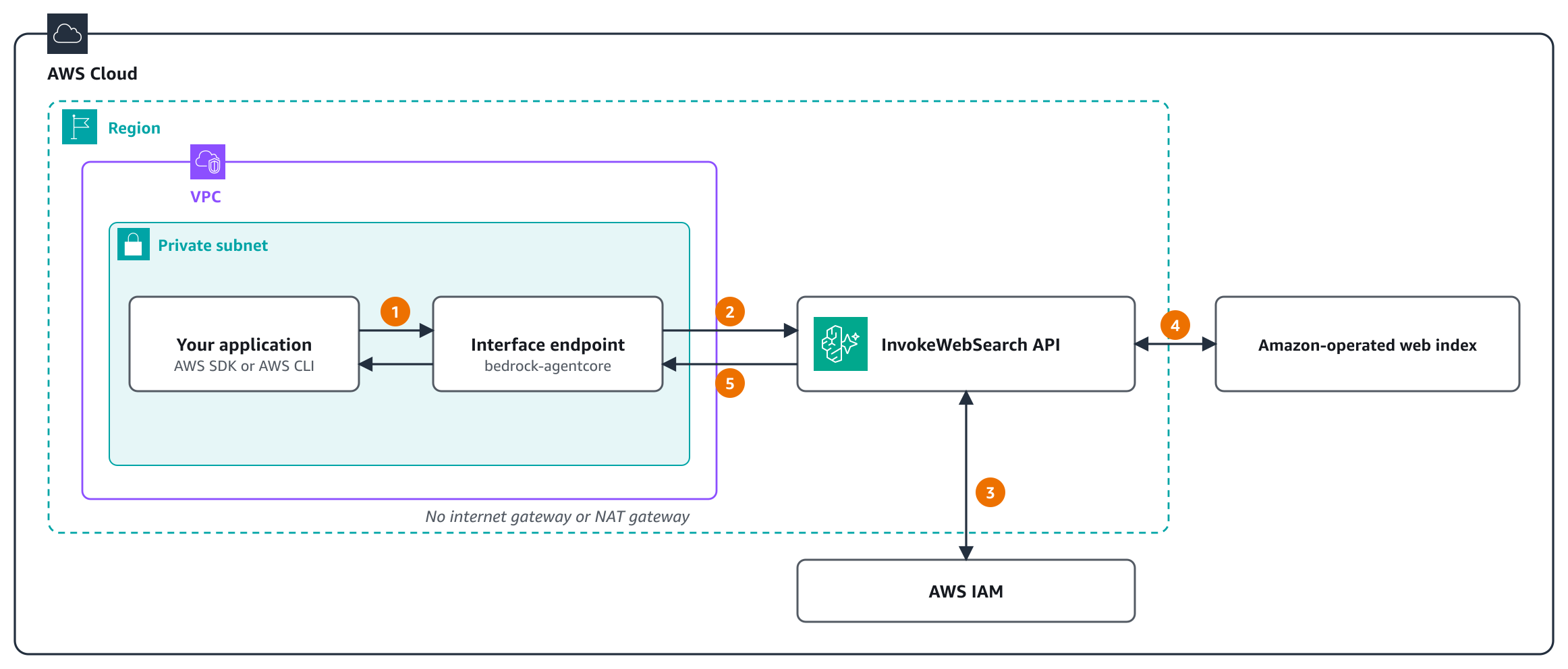
图 2:经 AWS PrivateLink 调用 Web Search API
按编号的步骤是:
你的应用在该 API 的标准 Regional 名称上调用 InvokeWebSearch。启用 private DNS 后,这个名字解析到你子网里的 interface endpoint。 endpoint 策略生效,请求经 AWS 网络抵达 API。 API 向 IAM 核查调用方是否有 bedrock-agentcore:InvokeWebSearch,包括任何 aws:SourceVpce 条件。 API 施加请求的过滤条件,搜索 Amazon 运营的网页索引。 结果经 endpoint 返回给你的应用。
要搭起来,在每一个会调该 API 的 VPC 和 Region 里,为 AgentCore data plane 服务 com.amazonaws.
aws ec2 create-vpc-endpoint \ --region us-west-2 \ --vpc-id vpc-0123456789abcdef0 \ --vpc-endpoint-type Interface \ --service-name com.amazonaws.us-west-2.bedrock-agentcore \ --subnet-ids subnet-0123456789abcdef0 subnet-0fedcba9876543210 \ --security-group-ids sg-0123456789abcdef0 \ --private-dns-enabled
打开 private DNS 后,API 的标准 Regional 名称 bedrock-agentcore.us-west-2.amazonaws.com 会在你的 VPC 内解析到 endpoint 的私有 IP。本文的 Boto3 和 AWS CLI 例子原样就能跑,不用设 endpoint URL。endpoint 的安全组必须允许来自调用该 API 的资源的入站 HTTPS(443 端口)。
PrivateLink 还在 IAM 之上给你几层控制:
Endpoint policies – 除你的 IAM policies 外,VPC endpoint policy 也作用于 InvokeWebSearch 请求,因此由你决定哪些 principal 能经这个 endpoint 搜索。同一个 endpoint 还承载其它 AgentCore data plane API,如 AgentCore runtime(Amazon Bedrock AgentCore 的一项能力)、Memory、Identity、Browser 和 Code Interpreter。若 VPC 里的工作负载也要调它们,就补上允许这些调用的 statement。下面这份策略只允许一个 role 经该 endpoint 调 API: { "Effect": "Allow", "Principal": { "AWS": "arn:aws:iam::111122223333:role/WebSearchAppRole" }, "Action": "bedrock-agentcore:InvokeWebSearch", "Resource": "arn:aws:bedrock-agentcore:us-west-2:aws:tool/web-search.v1" } 强制走私有路径 – 给授予该权限的 IAM policy 加一个 aws:SourceVpce 条件。这样该 role 只能经你的 endpoint 搜索,从 VPC 外发起的同一调用会被拒绝: { "Effect": "Allow", "Action": "bedrock-agentcore:InvokeWebSearch", "Resource": "arn:aws:bedrock-agentcore:us-west-2:aws:tool/web-search.v1", "Condition": { "StringEquals": { "aws:SourceVpce": "vpce-0123456789abcdef0" } } } 网络层控制 – 安全组与子网放置,决定哪些实例、容器和函数根本能抵达 endpoint。
在 Web Search API 可用的每个 Region 里,PrivateLink 都一样工作。interface endpoint 按标准 AWS PrivateLink pricing 计费。详见 Call AgentCore Web Search through AWS PrivateLink。
在控制台里试
写任何代码之前,你就能在 Amazon Bedrock AgentCore 控制台里试 Web Search API。在导航窗格的 Connections 下选 Web Search。
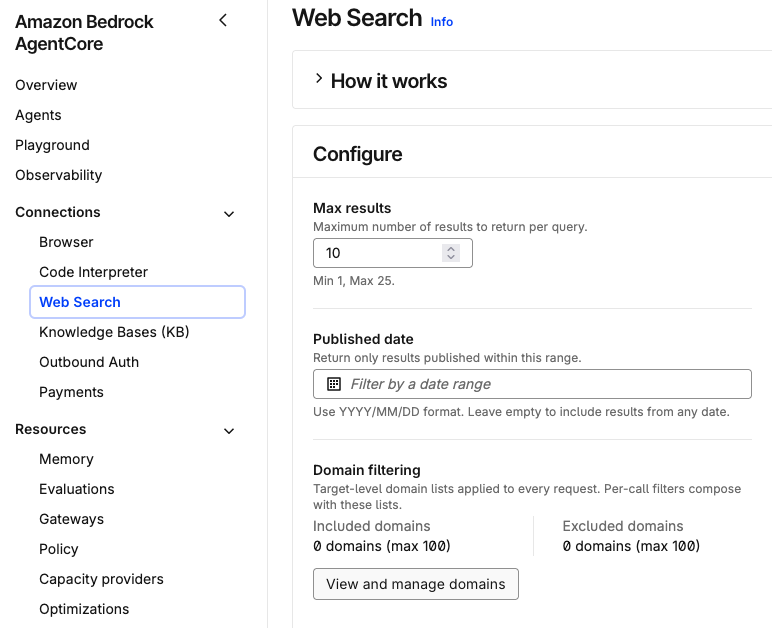
图 3:Amazon Bedrock AgentCore 控制台里的 Web Search
配置。在 Configure 面板里设置: Max results:每次查询返回多少条结果,1–25,控制台默认 10。Published date:一个 YYYY/MM/DD 格式的日期范围,只有落在其中的结果才返回,留空则含任意日期。Domain filtering:最多 100 个要包含的域名、最多 100 个要排除的域名。选 View and manage domains 编辑这两份列表。 测试。在 Test Web Search API 面板里输入一条最长 200 字符的查询。每次查询都按你的设置调 Web Search API。面板显示返回多少条结果、调用耗时多久,并逐条给出标题、文本片段、发布日期和来源 URL。图 4 展示一次对「How do I set up Amazon S3 lifecycle rules?」的搜索,结果限定在 aws.amazon.com 和 docs.aws.amazon.com。
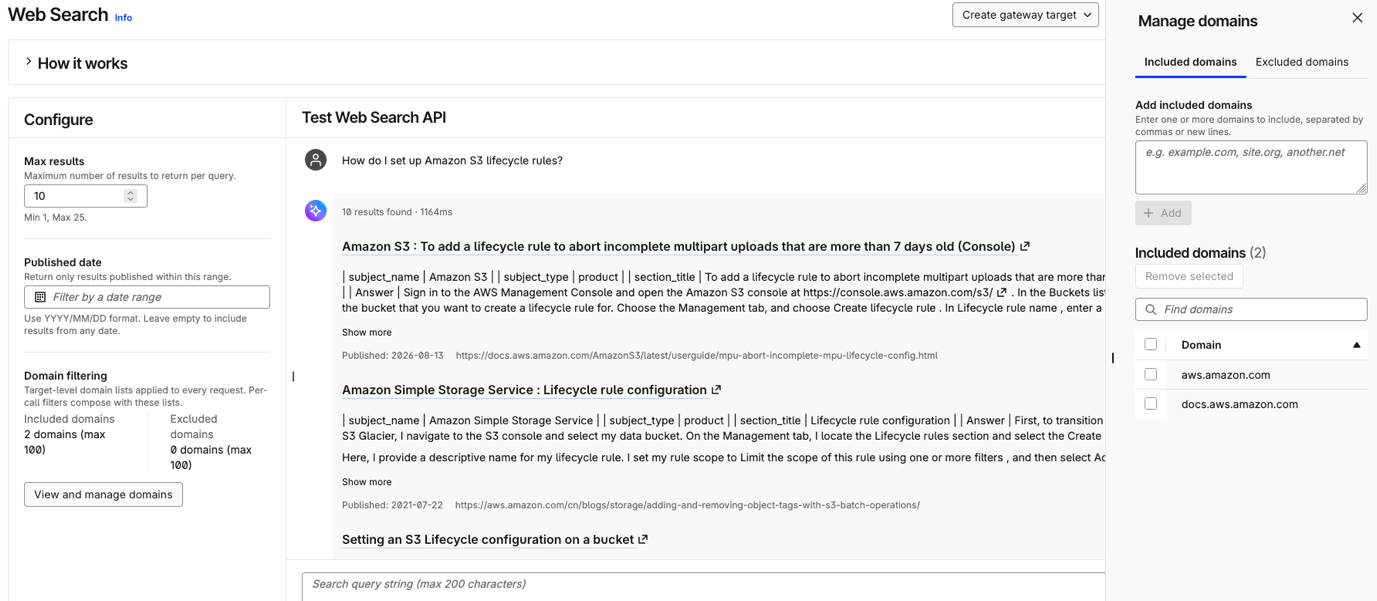
图 4:一次带包含域名的测试搜索
集成。结果看着对了,你有两个选项: Generate code snippet:拿到以同样设置调用 API 的代码,可直接粘进你的 agent 或应用。Create gateway target:把 Web Search 加成 AgentCore Gateway 上的一个工具,让 agent 通过 MCP 调用它。
控制台是用你自己的 IAM 身份给每次调用签名的,所以你的 role 需要 bedrock-agentcore:InvokeWebSearch 权限。
什么时候用 API,什么时候用 gateway
场景推荐路径 用 MCP 兼容工具构建 agentAgentCore Gateway 多个工具藏在一个 MCP endpoint 之后,带可选 MCP sessionsAgentCore Gateway 给许多 agent 和团队一份管理员来源策略AgentCore Gateway 需要搜索的 MCP client,例如用 AWS Web Search connector 的 ClaudeAgentCore Gateway 自定义编排Web Search API 非 agent 用例(dashboard、流水线)Web Search API 想直接控制重试与缓存Web Search API 给既有应用加网页搜索Web Search API
两条路径搜的是同一个索引,差别有这几处。gateway 还能用 JSON Web Token(JWT)给调用方授权,而 API 只用 IAM 授权。在 gateway 上,管理员可在 target 上设置对每次请求都生效、且调用方 agent 看不到的域名列表;用 API 时,每个请求自带其过滤条件。字段名也不同:API 收 searchQuery、publishedAfter、publishedBefore,gateway 的 MCP 工具收 query、from、to。更多指引见 Choose between the API and the Gateway connector。
定价
Web Search API 计量到与 gateway connector 相同的 usage type,因此按 Web Search 费率计费,每 1,000 次查询 $7。因为不涉及 gateway,没有 gateway 费用。详见 Amazon Bedrock AgentCore pricing。
可用区域
Web Search API 在 US East (N. Virginia)、US East (Ohio)、US West (Oregon)、Europe (Ireland)、Asia Pacific (Tokyo) 和 Asia Pacific (Sydney) Region 可用。当前清单见 Supported AWS Regions。
开始使用
用下面这些资源帮你上手。
Web Search API 文档 Amazon Bedrock AgentCore 上的 Web Search InvokeWebSearch API 参考
关于作者